Online Dub Stem Mixer Tutorial — Multi-Track Mixing with Effects
Getting Started
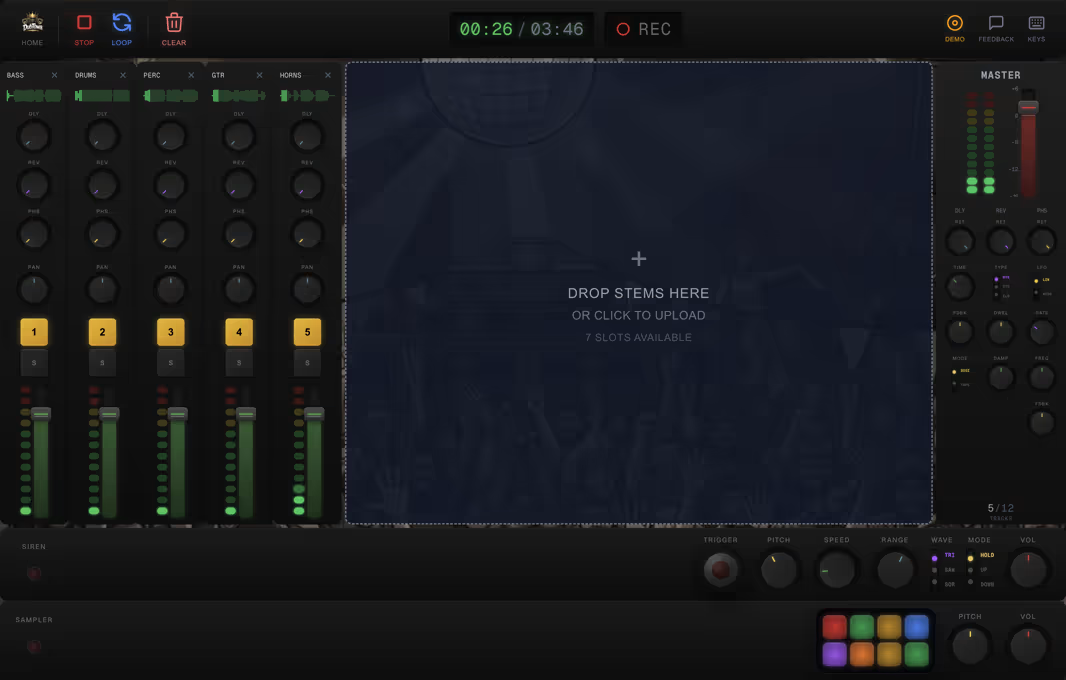
The Dub Stem Mixer is a multi-channel mixing console designed for stem-based dub mixing. Load individual stems (vocals, drums, bass, etc.) into separate channels and mix them live with effects.
To begin, tap the load button on any channel strip to load an audio file. Each channel gets its own volume fader, pan control, and FX sends. All channels play in sync from a shared transport.
Channel Strip
Each channel strip provides a complete set of mixing controls. The volume fader sets the channel level, while the pan knob positions the sound in the stereo field.
Use the mute button to silence a channel instantly — a key dub technique for creating dramatic drops and builds. The solo button isolates a channel so you can hear it on its own.
FX Sends
Each channel has dedicated send knobs for the built-in effects: echo and reverb. Turn up a send to feed that channel's signal into the corresponding effect bus.
This send/return architecture mirrors real hardware mixing desks. You can dub-mix in real time — push the snare into heavy echo, wash the vocals in reverb, and keep the bass dry.
Master Section
The master section controls the final output. The master fader sets the overall volume, and the master meter shows the output level.
Use the master section to balance the overall mix level and prevent clipping. Keep an eye on the meters — dub should hit hard but stay clean.
Transport Controls
The transport bar provides play, pause, and stop controls, plus a position scrubber for jumping to any point in the track.
All loaded stems play in sync from the transport. Use the loop toggle to continuously loop the playback region — useful for practicing dub mixes over a section.
Keyboard Shortcuts
Speed up your mixing workflow with keyboard shortcuts. Press Space to toggle play/pause. Number keys 1–4 toggle mute on the corresponding channels for rapid dub cuts.
These shortcuts let you perform live dub mixes without reaching for the mouse — drop channels in and out rhythmically, just like on a hardware desk.