Online Dub Sound System Tutorial — Tape Echo, Reverb & Effects
Getting Started
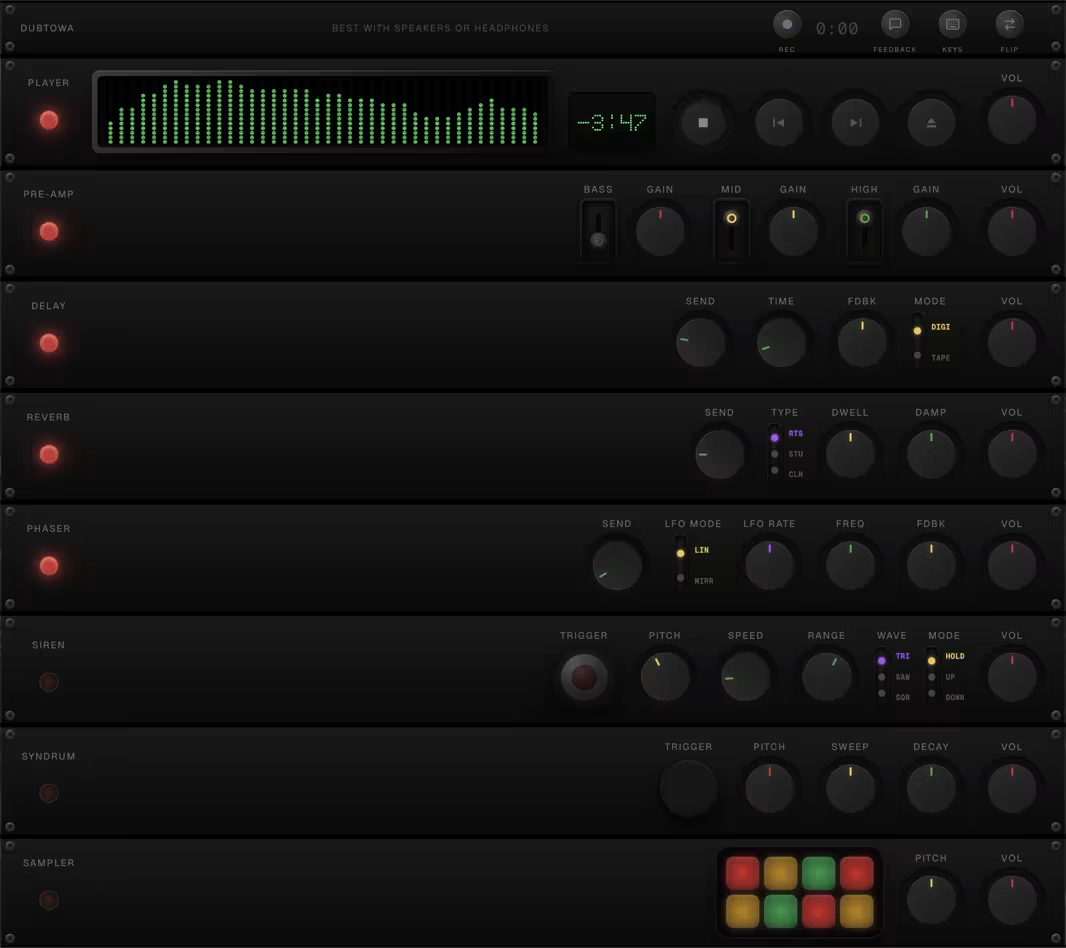
The Dub Sound System is a browser-based dub effects tower inspired by classic hardware setups. Everything runs locally in your browser using the Web Audio API — no uploads, no server processing.
To begin, tap the power button to initialise the audio engine. Then load a track by tapping the folder icon on the player panel. You can load any audio file from your device (MP3, WAV, FLAC, etc.).
Tape Echo
The tape echo emulates the warm, degraded repeats of a classic tape delay unit. Turn the Send knob to feed signal into the delay line, then adjust Time to set the delay interval (from 50 ms up to 4 seconds).
The Feedback knob controls how many repeats you hear — higher values produce longer, self-oscillating trails. The Volume knob controls the wet level of the echoes in the mix. Use the high-pass filter to thin out the repeats and keep the low end clean.
Spring Reverb
The reverb adds spacious depth to your mix. Use Send to control how much signal feeds into the reverb, and Volume to blend the wet signal back in.
Adjust Decay to set how long the reverb tail lasts. Short decay times give a tight room feel, while longer values create cavernous dub spaces.
Phaser
The phaser creates swirling, phase-shifted textures. It works on the same send/return model — use Send to feed signal and Volume to control how much phased sound comes back into the mix.
Adjust Speed to set the LFO rate and Depth to control how pronounced the sweep is. Slow speeds with moderate depth produce the classic dubby underwater effect.
Dub Siren
The built-in siren generates classic dub siren tones. Select a waveform (sine, square, sawtooth, or triangle) and hit the trigger to fire it. Adjust pitch and speed to shape the siren character.
The siren has its own LFO for modulation — experiment with different combinations of waveform, speed, and range to create everything from subtle wobbles to screaming sirens.
Syndrum
The syndrum generates synthetic percussion hits — the signature swooping toms heard across countless dub records. Tap the trigger pad to fire a hit.
Adjust Pitch to set the starting frequency and Sweep to control how far the pitch drops. Decay controls how long each hit rings out. Route it through the echo and reverb for massive dub percussion.
Sampler
The sampler lets you capture and replay short audio snippets on the fly. Load a sample from your device or record one live from the playing track.
Use the trigger to replay your sample. Combined with the echo and reverb sends, you can create layered dub textures from any source material.
Crossover Filter
The crossover splits your signal into frequency bands, giving you control over how effects are applied to different parts of the spectrum.
Use the crossover to isolate the bass from the rest of the mix, keeping low frequencies solid while sending mids and highs through heavy effects — a fundamental dub mixing technique.